Mirage: A Virtual Terminal for AI Agents

Mirage is a virtual terminal for AI agents. It virtualizes the terminal environment, so AI agents can use a terminal everywhere.




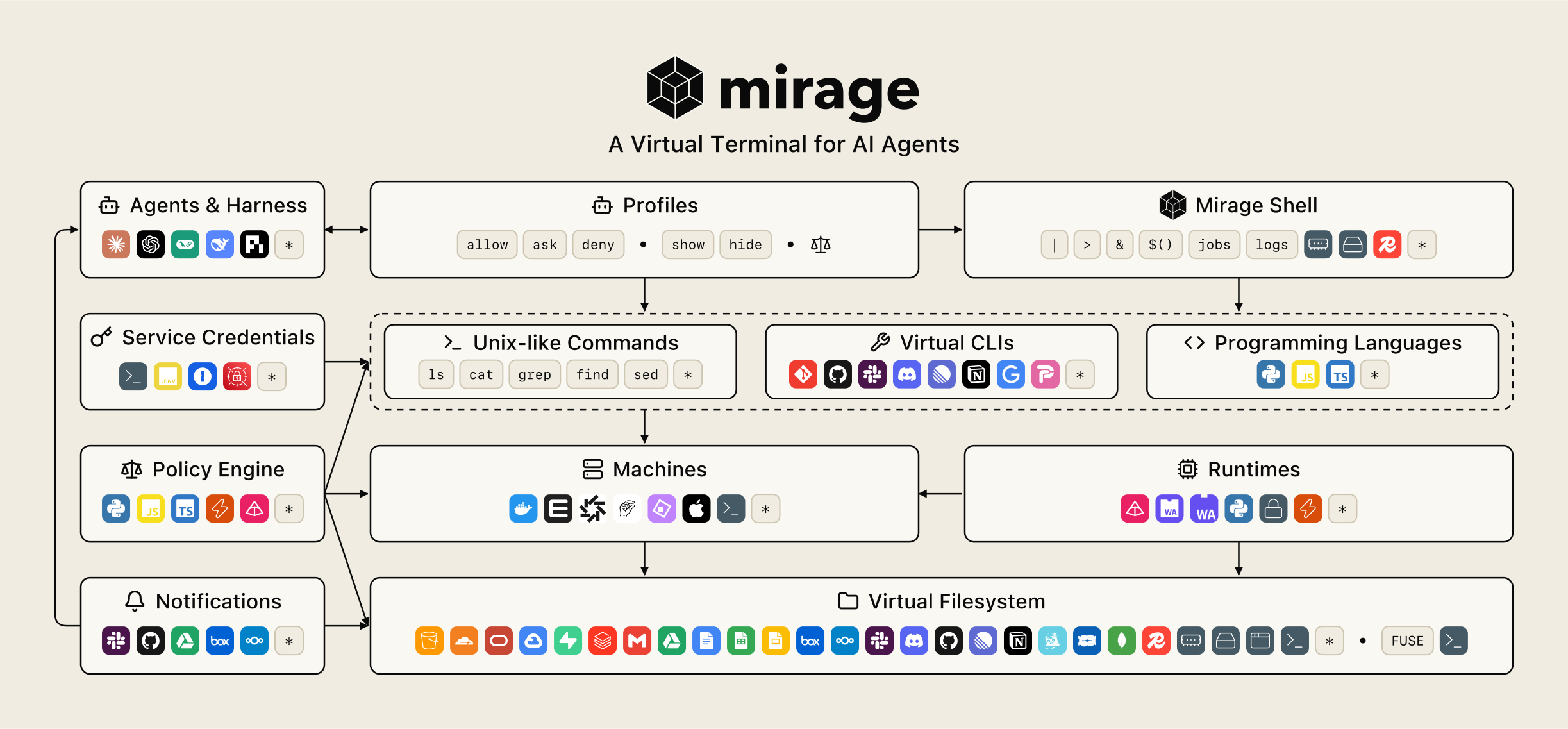
LLMs are post-trained in terminal environments, so AI agents are most familiar with the terminal interface. But a terminal today is bound to a single machine and its operating system kernel, with its files and its computation on that same machine.
Today we officially release Mirage, a lightweight virtual terminal which separates the terminal interface from the data storage and the computing machines. It virtualizes the shell, the filesystem, the CLIs and the machines.
With Mirage, each virtual terminal starts with only KBs of memory, so AI agents can use terminal environments everywhere, inside an application, a mobile app, a browser tab, a FastAPI or Express server, and even an edge device such as a Raspberry Pi.
Unified Virtual Filesystem
The base of the virtual terminal is a unified virtual filesystem. As LLMs are post-trained heavily on the terminal, Unix-like tools such as ls, cat, grep, find and jq are already in their memory. Mirage virtualizes about 60 data stores, such as S3, Google Drive, Slack, Gmail, Notion, GitHub, Postgres, Redis and local disk, into one virtual filesystem where each appears as files. One command line from an agent then works across services, such as grep -rl invoice /slack /gmail > /s3/hits.txt.
Mirage also integrates each service's own cloud features into Unix command semantics. For example, grep -r uses the service's cloud search, such as Google Drive, Slack or Gmail search.
A real  Virtual Terminal, running in browser?Built on the real @struktoai/mirage-browser. Every command runs in Mirage, inside this browser tab.
-r, -R, -l, -w and -i and a few builtins are allowed. A GitHub token in Settings lets grep ask GitHub's code search first.Virtual CLIs
Beyond the Unix-like commands, Mirage virtualizes agent tools as CLIs, such as gh for GitHub, slack, ntn for Notion and linear, without system installation. Each CLI is embedded in the virtual terminal and stays virtualized, yet --help, man and which treat it like an installed program. One tool can be virtualized several times under different profiles, each with its own credentials, and any other tool can be registered as a custom CLI.
As CLIs, the tools are exposed progressively. An agent reads a CLI's --help for its subcommands only when it needs that tool, then one subcommand's --help for its options, so only what it needs enters its context instead of every tool's schema up front. One shell instead of a tool per service also saves tokens, up to 90% fewer than MCP tools in the AgentVFS evaluation. Mirage can also document the installed CLIs in a SKILL.md, each with its top-level help, leaving out anything the session's profile denies.
An MCP tool can become a command of a virtual CLI too, used the same way as any other CLI. Its --help prints the tool's description and the JSON schema of its arguments, and it takes those arguments as one JSON object.
A real Virtual Terminal, running in browser?Built on the real @struktoai/mirage-browser. Every command runs in Mirage, inside this browser tab.
deepwiki-mcp, following the MCP documentation. The name can be changed in Settings.Policies
Policies give fine-grained control over how the terminal is used, based on the commands, the virtual filesystem and other metadata of each session. Every session runs under a profile. allow, ask and deny rules accept or reject each command and CLI, hide and show rules decide which files a session sees, and each VFS's mode decides where it may write. A hidden file is missing from listings and fails to open as if it never existed.
The policy layer is scriptable too. A policy script runs in a small sandbox inside the process and gets the command, its arguments, the paths it touches, the working directory and the session's variables, and can read files through the virtual filesystem before it decides. It can refuse the command, hold it for a person to approve, or pick the machine it runs on, and the same engine is asked before every network connection.
def pre_command(ctx): for path in ctx["paths"]: if path.startswith("/project/incoming/"): if "| sh" in open(path).read(): return {"kind": "ask", "reason": "the file pipes a download into sh"}A real Virtual Terminal, running in browser?Built on the real @struktoai/mirage-browser. Every command runs in Mirage, inside this browser tab.
*.pem files and the secrets folder are hidden while the folder's README is shown, rm, mv and curl are denied, and a policy script asks for approval before a command reads a file that pipes a download into sh.Virtual Machines
Computation is separated from the terminal interface and the virtual filesystem. Each language interpreter and CLI can live on its own machine, such as a lightweight Python interpreter on an in-process virtual machine, a container, a cloud sandbox, a GPU instance or an SSH host.
A machine can be set to capture specific commands, and a route policy changes the machine line by line from its context, not only the command and its arguments but also what it reads on the virtual filesystem. A short script stays in process, a training job goes to a GPU, and each agent can get its own machine. The agent types the same commands either way, and its files do not move.
PACKAGES = ("numpy", "pandas")def source(ctx): code = ctx["line"] for command in ctx["commands"]: for path in command["paths"]: if path.endswith(".py"): code += open(path).read() return codedef pre_execute(ctx): if not any(c["command"].startswith("python") for c in ctx["commands"]): return None if any(package in source(ctx) for package in PACKAGES): return {"kind": "route", "machine": "pyodide"} return {"kind": "route", "machine": "monty"}A real Virtual Terminal, running in browser?Built on the real @struktoai/mirage-browser. Every command runs in Mirage, inside this browser tab.
Mirage Shell
The shell is rewritten in Rust, both the bash parser and the commands such as awk, cut, diff and cat, so one line works the same over every data store, CLI and machine behind the virtual terminal. Pipes, redirection, variables, functions, background jobs and history work across the virtual filesystem, the virtual CLIs and the machines, so gh pr list | grep fix > /s3/prs.txt reads a CLI, filters it and writes to S3 in one line.
Each part of the shell's state can be kept on one's own infrastructure. Sessions, with their working directory, variables and functions, are kept in RAM, on disk, in Redis or in S3, and background jobs with their output in RAM or Redis.
A real Virtual Terminal, running in browser?Built on the real @struktoai/mirage-browser. Every command runs in Mirage, inside this browser tab.
jobs and wait. Job output stays in RAM until an Upstash Redis URL is set in Settings.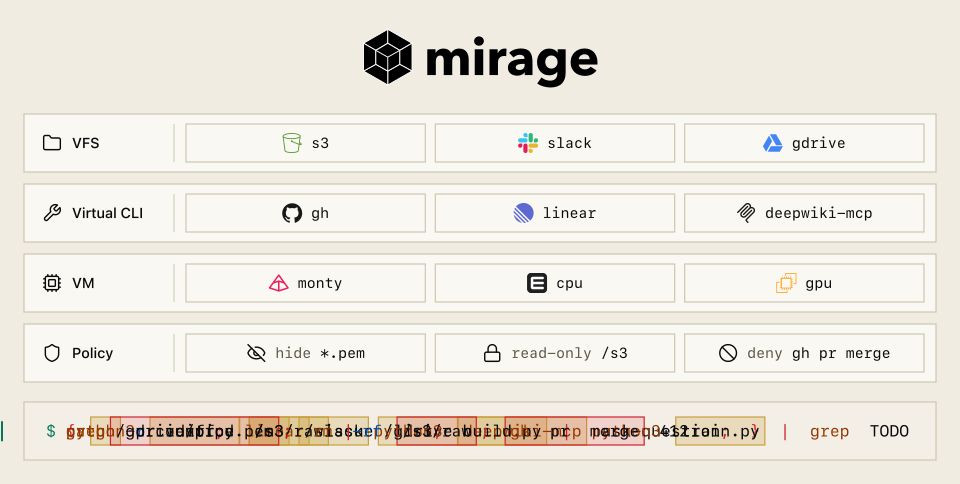
In Summary
- Controllable. Each agent gets only the files, commands, credentials and machines its profile allows.
- Scriptable. The whole terminal is defined in code or one config file, from its filesystems, CLIs and machines to its rules.
- Managed. State lives on infrastructure that already runs, such as RAM, disk, Redis or S3, and every command is recorded and can be exported as an OpenTelemetry trace.
- Lightweight. Each workspace takes only KBs of memory and Mirage is async from the shell down to each service call, so one process serves many agents at once. It can be deployed almost everywhere, to a Python or TypeScript server, a browser tab, a Cloudflare Worker or a Raspberry Pi.
$uv add mirage-ai$npm install @struktoai/mirage-node$npm install -g @struktoai/mirage-cliSee the Mirage page for more details, the installation page for each package and its requirements, the documentation and the repository. More from Strukto is on the home page.