Optimizing S3 for AI Agents That Use Object Storage as a Filesystem
S3 is great object storage, but agents do not want to think in buckets, SDK calls, pagination, and ad hoc checkpoints. Mirage gives agents a virtual filesystem path for S3 with streaming reads, cache, and rollback that reuses S3 object versions.

S3 is one of the most useful places to store logs, datasets, exports, media, and model artifacts. It is durable, cheap, and widely supported.
But S3 is not a filesystem. It is object storage. That difference matters when an AI agent is trying to inspect data, repeat a run, or recover the exact bytes it saw earlier.
An agent usually does not want to think in buckets, continuation tokens, SDK clients, retries, byte ranges, and checkpoint files. The model already has a strong prior for paths and shell commands. It wants to ask simple questions:
$ls /s3/logs/2026/$head -n 3 /s3/events.jsonl$grep error /s3/app/*.jsonl$wc -l /s3/export/users.csvThat is the gap Mirage tries to close.
The Simple Idea
Mirage mounts S3 into a virtual filesystem path, then lets the agent use normal shell commands against that path.
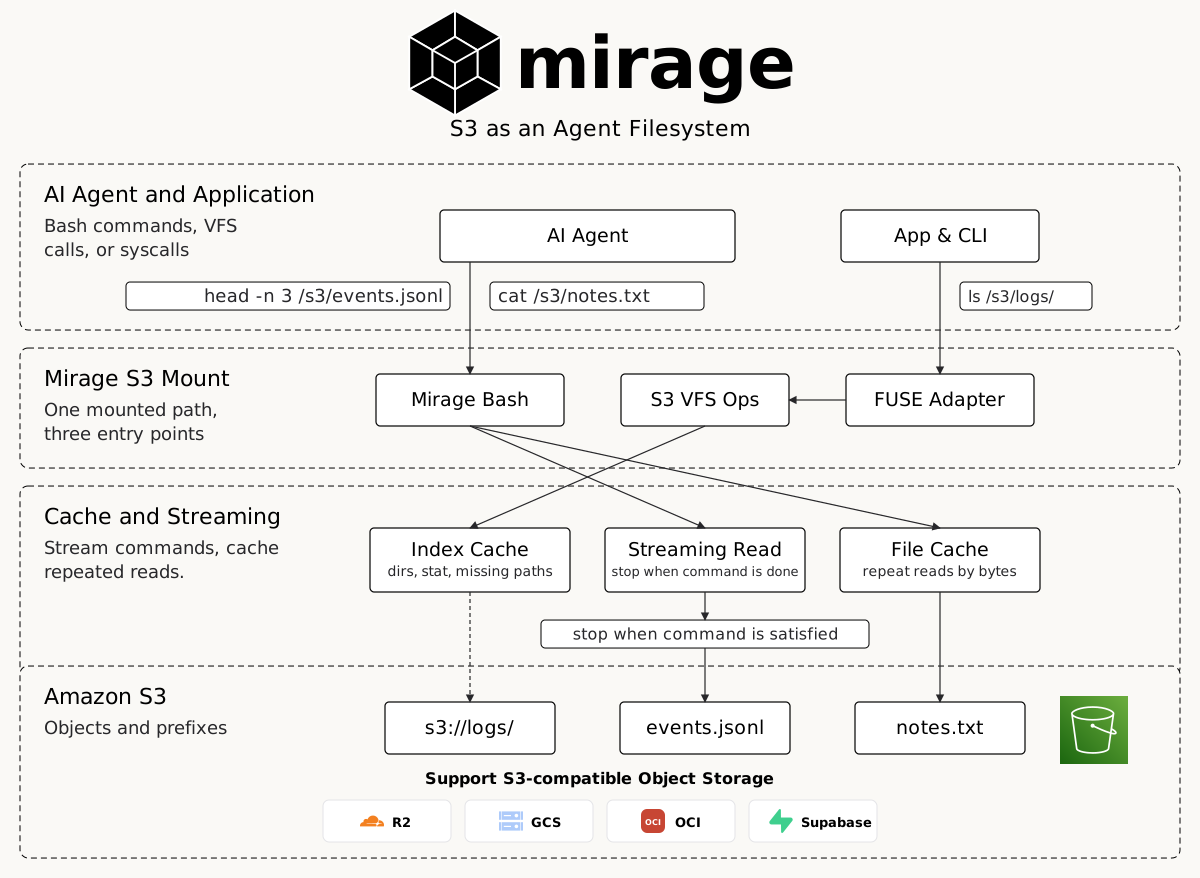
The agent sees files and directories. Under the hood, Mirage turns those requests into S3 operations:
| Agent asks for | Mirage maps it to |
|---|---|
ls /s3/logs/ | S3 prefix listing |
stat /s3/file.jsonl | object metadata |
head -n 3 /s3/events.jsonl | a streaming preview that can stop early |
grep error /s3/*.jsonl | command dispatch over matching objects |
cat /s3/data.csv | byte read, stream, or cached file read |
Why Cache Matters
Agents behave adaptively. They list a directory, inspect one promising file, change plans based on what they find, check nearby metadata, preview a few lines, then branch into the next command.
Without a cache, every small question becomes a remote request. On S3 that means extra latency, pagination, and repeated downloads of the same bytes.
Mirage separates two kinds of reuse:
- Index cache: directory listings, object metadata, and known missing paths.
- File cache: file bytes that were already read by earlier commands.
That split matters because ls and stat should not need to download object bytes. A repeated head or grep should not need to fetch the same content again either.
Streaming as the General Path
Many agent commands only need a slice of a file.
head -n 3 does not need a whole log archive. It needs enough bytes to find three newline boundaries. A byte-counted preview such as head -c 200 has an even clearer stop condition.
The general primitive here is streaming with a command-level stop condition. Mirage can read an object as a stream, feed it into the command, and stop consuming once the command is satisfied.
That is a semantic optimization at the command-to-storage layer. Mirage does not need to understand the business meaning of the data. It only needs to understand that head can stop after enough lines, wc can count as bytes stream through, and a pipeline can stop when the downstream command is done.
For head -n 3, the stop condition is three newline boundaries. For head -c 200, it is 200 bytes. For grep payment_failed /s3/events.jsonl | head -n 20, the downstream head stops the pipeline once it has 20 matching lines.
That is what makes shell composition work:
$cat /s3/events.jsonl | grep payment_failed | head -n 20Streaming is the right default because it handles pipes, unknown file sizes, arbitrary line lengths, and commands that process data progressively.
That makes it more general than planning a fixed byte range up front. A byte range is useful when the caller already knows the exact byte bounds it wants. In a pipeline like cat /s3/events.jsonl | grep payment_failed | head -n 20, AI agents do not know where the first 20 matching lines are before the command starts. The right behavior is to stream through the object, let grep filter progressively, and stop when the downstream head is satisfied.
What Mirage Does Today
Mirage optimizes streaming based on command semantics. It streams data into commands and lets each command stop when it has enough output. For example, head -n 3 should not behave like cat. Mirage reads only until the command has the three lines it asked for, then stops. The optimization stays below the interface. The agent writes normal shell commands; Mirage decides how much of the S3 object to read and when to stop.
What the Unoptimized Path Costs
The direct S3 request charge is usually not the scary part. AWS lists S3 Standard GET requests at $0.0004 per 1,000 requests in a pricing example, so one million preview requests is about $0.40 in request charges.
The expensive part is moving and processing bytes you did not need. AWS also shows S3 data transfer out to the internet at $0.09/GB in a pricing example. Actual bills vary by region, transfer tier, free tier, storage class, and whether the consumer runs inside the same AWS Region.
The request count can look harmless while the byte shape is the real problem. Processing one full 1 GB object for a three-line preview is very different from a command that streams and returns once the preview is done, especially when an agent repeats that pattern thousands or millions of times.
Even when same-region AWS data transfer is free, avoiding unnecessary full-object reads still reduces latency, parser work, memory pressure, and token exposure.
What Is Different From a Normal S3 Mount
A traditional S3 mount exposes object keys as files and mostly stops there. Mirage treats the command and the file type as part of the read path, which matters for formats that are not useful as raw bytes.
For .parquet, a normal Unix-style read is not helpful to an agent. cat returns binary; head does not naturally mean "show me the first rows"; grep has no schema context. Mirage can make those commands format-aware:
$head /s3/events.parquet$cat /s3/events.parquetThe object still lives in S3. The virtual filesystem gives Mirage room to return a typed view of it: schema, columns, and table previews instead of an opaque binary blob. That is the part a normal POSIX-style mount does not provide.
Rolling Back With S3 Object Versions
S3 already has a useful rollback primitive: when bucket versioning is enabled, every overwrite creates a new object version. Mirage can reuse that instead of asking the agent to invent its own checkpoint scheme.
This matters because agents do multi-step work. They inspect source data, write derived artifacts, notice a bad transform, and then need to get back to the exact S3 object version they used earlier:
$head -n 20 /s3/events.jsonl$grep payment_failed /s3/events.jsonl > /analysis/payment_failures.txt$cp /analysis/payment_failures.txt /s3/reports/payment_failures.txtIf /s3/events.jsonl or /s3/reports/payment_failures.txt changes later, the agent should not have to guess which bytes were part of the earlier state. It needs a rollback handle.
When Mirage reads an S3 object, it can record two backend-native markers:
ETag, used as a fingerprint to detect that the live object changed.VersionId, used as a rollback pin to fetch the exact object version again.
For rollback, Mirage does not need to copy every S3 object into a separate checkpoint bucket. If an earlier read captured a VersionId, Mirage can bind the virtual path back to that version and recover the same bytes from S3's own history, even if the current head of the key was overwritten later.
Without S3 bucket versioning, Mirage can still use fingerprints to detect drift: it can tell the caller that the live object no longer matches what the agent read before. With bucket versioning enabled, Mirage can go further and recover the original bytes by reusing S3's own version history.
That is the important versioning story for agents on S3: keep the agent's interface as /s3/..., but make rollback point at S3's native object versions whenever the bucket exposes them.
Why This Pain Point Is Showing Up Now
Amazon S3 Files is a good signal that this problem is real: applications, agents, teams, and shell tools increasingly expect S3 data to behave like files and folders.
The pain is not only API ergonomics. It is also cost shape. The S3 pricing page for S3 Files splits out high-performance file-system storage plus data access charges for reads, writes, and sync. That is a reminder that file-like access to object storage is not free magic; where data is cached, copied, read, and synchronized matters.
Agents make the cost problem sharper because they ask many small repeated questions. If a tiny preview turns into a full-object read, the agent pays in bytes moved, latency, memory, parser work, and sometimes tokens. Mirage's bet is that a filesystem-shaped command layer can avoid a lot of that waste: keep S3 as object storage, stream when composition needs it, and cache repeated work.
Next
This is the first version of the S3 story. The next useful step is a small benchmark: first-run ls with an empty cache, repeated ls after the listing is cached, first-run stat, repeated stat, streaming head, and repeated grep.